
For Small and Medium Enterprises (SMEs), running payroll at the end of the month can feel like navigating a maze. Between tracking daily attendance, accounting for split shifts or late arrivals, calculating overtime, and managing salary advances, manual math often leads to costly errors or frustrated employees.
Whether you run a manufacturing unit, a retail chain, a healthcare facility, or a tech service firm, understanding how to accurately calculate employee salary based on attendance and working hours is vital for maintaining cash flow and workforce trust.
1. The core formulas for attendance-based salary
Depending on your industry and employment contracts, pay structures generally fall into two categories: monthly fixed salary with attendance deductions, or hourly / shift-based pay.
Method A: Monthly fixed salary (per-day calculation)
Most salaried SME staff receive a fixed monthly compensation package. To calculate their net pay for a specific month, use the gross monthly pay divided by the total payable days in that month.
- Daily rate = Gross monthly salary ÷ Total days in month
- Net salary = (Daily rate × Present days) + Paid leaves − Deductions
Example: An employee earns ₹30,000 per month in a 30-day month. They were present for 24 days, took 2 paid leaves, and had 4 unpaid absences.
- Daily rate: ₹30,000 / 30 = ₹1,000
- Payable days: 24 + 2 = 26 days
- Gross pay: ₹1,000 × 26 = ₹26,000
Method B: Working hours & shift-based pay
For staff working variable hours, factory shifts, or split schedules, pay is calculated directly from total logged hours.
- Base salary = Total hours worked × Hourly rate
- Overtime pay = Overtime hours × (Hourly rate × OT multiplier)
2. Step-by-step payroll calculation process
Calculating salary without missing key variables requires a clear workflow:
- Gather verified punch-in data. Consolidate attendance logs from biometric devices (fingerprint / face scanners) or mobile PWA attendance logs. Ensure all punch-ins and punch-outs for the month are accounted for.
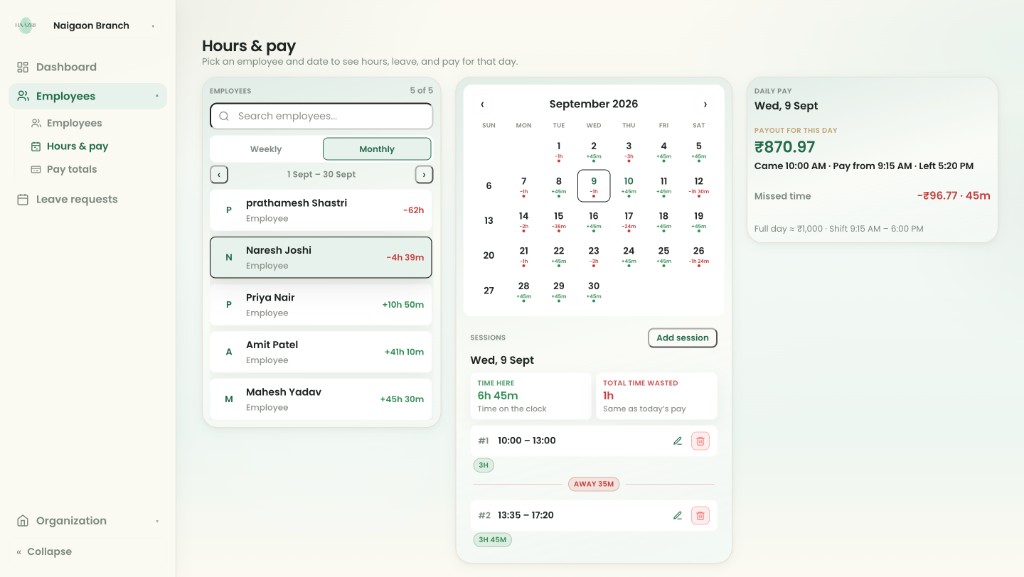
- Apply half-day & late arrival rules. Apply your company policies for late arrivals (e.g. 3 late arrivals equal 1 half-day) and break-shift patterns (such as lunch or split shifts).
- Calculate overtime and paid leaves. Separate standard working hours from overtime hours. Multiply OT hours by your agreed rate (typically 1.5× or 2× regular hourly pay). Add approved paid leaves (casual leave, sick leave) to payable days.
- Deduct advances & statutory liabilities. Deduct any salary advances or cash payouts given during the month, along with applicable statutory deductions (PF, ESI, or professional tax).
Biometric devices prevent buddy punching and streamline hours tracking.
3. Common payroll scenarios in SMEs
| Scenario | Challenge | Formula / policy solution |
|---|---|---|
| Break shifts / lunch punches | Employees punch out for mid-day breaks or dual shifts. | Deduct unpaid break hours from total daily log: Net working hours = Total on-site hours − Unpaid break hours |
| Late arrivals & early departures | Frequent 15–30 minute delays add up over a month. | Set a grace period window (e.g. 15 mins). Calculate precise hourly fractions rather than whole-day penalties. |
| Mid-month salary advances | Staff requesting cash advances prior to payday. | Log advances in real time to auto-deduct: Final payout = Calculated net pay − Outstanding advances |
4. How automated tools (like Haazri) eliminate manual mistakes
Managing these calculations in spreadsheets like Excel often leads to broken formulas, missing punch data, and manual entry errors — especially as your team grows beyond 10–15 people.
Modern attendance and payroll software simplifies this process by integrating attendance capture with payout engines:
- Hardware & mobile sync: Biometric punch machine logs sync directly with mobile apps, eliminating manual data re-entry.
- Worker transparency: Employees can cross-verify their daily punch-ins, overtime, and advances from their phone app, preventing payday disputes.
- Automated multi-shift support: Handles complex working hours, including split shifts, night shifts, and flexible hours without manual spreadsheet adjustments.